
Overlapping delivery dates
Every time delivery dates overlap or move, you have to re-check the related plans.

Car Delivery Schedule Field For car dealerships
See every delivery on a calendar. Manage customers, vehicles and delivery schedules from your phone.

Every time delivery dates overlap or move, you have to re-check the related plans.
When contact details and vehicle information live in different places, finding them takes time and records get missed.
The more deliveries a month holds, the harder it is to see which vehicle goes to whom, and when.

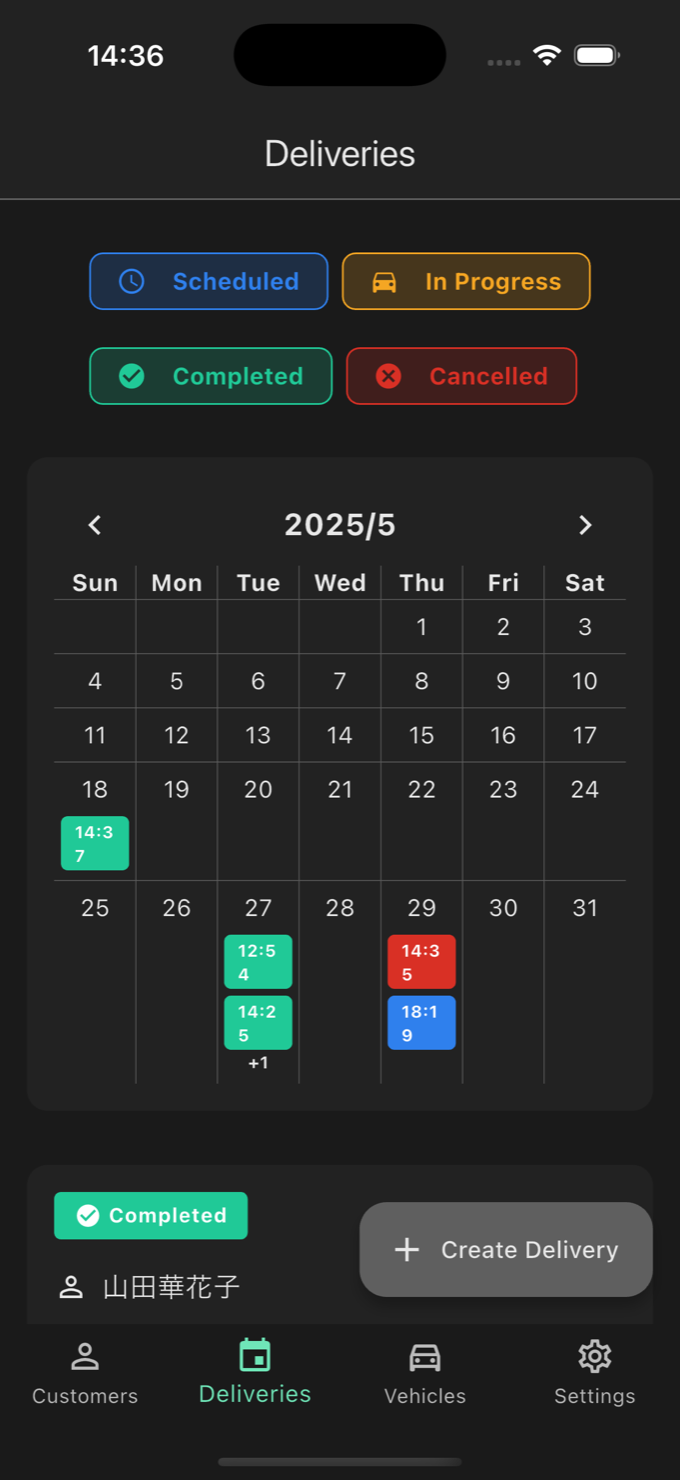
Delivery times appear on a monthly calendar, color-coded by status. Filter by status or date to grasp this month at a glance.
Register customers and vehicles once, then choose them when you create a delivery. Each delivery also records its scheduled time and notes.
Search customers by name, phonetic name, email, phone, address and memo, and vehicles by VIN, stock number, model, color and notes.
The information a delivery needs, kept simple and easy to read.
See this month's deliveries at a glance with color-coded time chips (scheduled, in progress, completed, cancelled). Filter by date or status.
Store name, phonetic name, contact details, address, birth date and memo, and search by name, phone, address, notes and more.
Store VIN, stock number, model, year, color, mileage, prices and more, and search by VIN, stock number, model, color and notes.
Deliveries have four statuses: scheduled, in progress, completed and cancelled. You can also record a vehicle's state (In Stock, Reserved, Delivered, Sold Out), chosen manually.
Switch between light and dark mode. The display language follows your device settings (Japanese and English cover the main feature screens; other languages cover basic screens only).
Sign up with email and password. Data is stored per account and syncs to the devices signed in to the same account.
The customer, delivery and vehicle lists.

Search by name and more to find customers quickly.

See deliveries as cards. Each status is shown in color and in text.

Search by VIN, model and more to find registered vehicles.
Screens shown use sample data.
Install the app from the App Store or Google Play and sign up with your email address and a password.
Add your customers and vehicles. Search the lists to find what you registered.
Choose a vehicle, customer and time to create a delivery, and it appears on the monthly calendar.
Built for people who handle deliveries at car dealerships, new and used.
Manage everything from customer and vehicle records to delivery schedules and status on your phone.
Find vehicles by VIN, stock number, model or color, and link them to deliveries.
A monthly calendar with status colors shows this month's deliveries at a glance.
What is stored, and what the app does not do.
Customer, vehicle and delivery data is stored in Google's Firebase (Cloud Firestore) in a separate area for each account (store), and only that login can write to it. We do not guarantee who else can read the data. See the privacy policy (Japanese only) for details.
You can delete your account from the settings tab. In the version currently in the stores (1.0), the customer, vehicle and delivery data you registered is not deleted.
Release builds send information about crashes and other app problems to Firebase Crashlytics.
The app needs an internet connection and an account. It is not suited to offline-only use.
Questions people ask before they start.
It is an app for iPhone and iPad (iOS 18.0 or later) and Android (7.0 or later). There is no web or Windows version.
Free to download from the stores (as of September 29, 2026). The app has no in-app purchases and no ads.
No. You sign in with an email address and password only, and there is no email verification step.
Japanese and English cover the main feature screens (a few screens such as password reset are Japanese only). Other languages cover basic screens only. The display language follows your device settings.
No. There are no push or email notifications, no photo or document attachments, no CSV or PDF export, and no sharing or backup features.
An internet connection is required. It is not suited to offline-only use.
Available for iPhone and iPad (iOS 18.0 or later) and Android (7.0 or later). Sign up with your email address and get started. An internet connection is required.
An account (email and password) is required. Free to download from the stores (as of September 29, 2026).


Scan with your phone to install

